Marketplace fee and net profit calculator for sellers
See what you really keep from a sale after fees, shipping and advertising, and the price you need to hit a target margin.
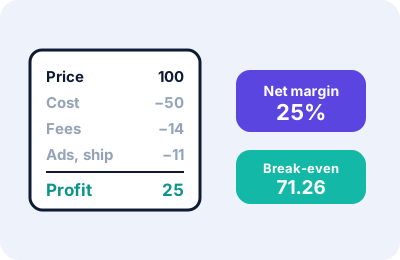
What this calculates
For one sale, the tool subtracts your item cost, shipping, packaging, platform commission, payment fee, fixed fee, advertising and other costs from the selling price, and shows your net profit, your net margin, and the break-even price. If you enter a target net margin, it also shows the price you would need to charge to reach it.
How to use this tool
- Enter the selling price the customer pays for the item.
- Enter what the item costs you, plus shipping and packaging if you pay for them.
- Enter the percentage fees that your platform and payment provider charge. Look them up in your own seller account, because this tool does not know them.
- Add any fixed fee per order and the advertising cost for each sale.
- Optionally add a returns allowance and a target margin, and read the results.
The formulas
- Percentage costs = price × (commission + payment fee + returns allowance) ÷ 100.
- Fixed costs = item cost + shipping + packaging + fixed fee + advertising + other.
- Net profit = price − percentage costs − fixed costs. Net margin = net profit ÷ price.
- Break-even price = fixed costs ÷ (1 − percentages ÷ 100).
- Price for a target margin = fixed costs ÷ (1 − percentages ÷ 100 − target ÷ 100).
Worked example
Price 100, item cost 50, shipping 5, packaging 2, commission 10%, payment fee 3%, fixed fee 1, advertising 4. Fees are 10 + 3 + 1 = 14. All costs are 50 + 5 + 2 + 4 + 14 = 75, so the profit is 25 and the margin is 25%. The break-even price is 62 ÷ 0.87 = 71.26, and the price for a 20% margin is 62 ÷ 0.67 = 92.54. Add a 5% returns allowance and the profit drops to 20, the break-even price rises to 75.61, and a 20% margin needs a price of 100.
Limits
- Every percentage is applied to the selling price, which is how many platforms charge, but check yours. Some fees are charged on the price plus shipping.
- The returns allowance is a simple average cost, not a model of real returns, where you may also lose the item and shipping.
- Taxes, currency conversion, storage fees and your own time are not included unless you add them to “other costs”.
- Percentages must add up to less than 100.
Troubleshooting
| What you see | Likely reason | What to try |
|---|---|---|
| “Enter the selling price” | The price box is empty or zero | Enter the price |
| Percentages add up to 100 or more | Fees entered as whole numbers by mistake | Enter 10 for 10%, not 1000 |
| “Target margin: not possible” | Fees plus target reach 100% | Lower the target or the fees |
Notice
This is a general-purpose calculator for information only. It is not financial, tax, accounting, customs or legal advice. Rates, fees and rules differ between sellers, platforms, carriers and countries, and the figure on a real invoice or carrier quote is what counts.
Practical scenarios
- Rising ad costs. In the worked example the profit is 25 with an advertising cost of 4 per sale. If the advertising cost per sale rises to 10, the profit falls to 19, and the net margin to 19%. The most you can spend on advertising per sale before losing money is the profit before ads, which here is 29.
- Free shipping. If you offer free shipping and pay 5 yourself, enter 5 in the shipping box. Compare the result with the profit if you charge the customer instead.
- Checking a new platform. Enter the commission and payment fee that the platform publishes, keep everything else the same, and compare the net profit with your current platform.
Using the break-even price
The break-even price is the lowest price at which a sale does not lose money. Never price below it unless you have a reason, such as clearing old stock. Use the target margin box to find a price that gives you the profit you want.
What the tool leaves out
- Taxes on your profit, and sales tax collected on behalf of the authorities.
- Monthly subscriptions or listing fees that are not charged per sale. Divide them by your expected sales and enter the result in “other costs”.
- The cost of unsold stock, storage and your time.
For help choosing a price, read our guide to margin versus markup.
Where to find your numbers
- Commission and fixed fees are on your platform’s seller fee page and in monthly statements.
- Payment fees are on your payment provider’s fee schedule.
- Shipping cost can be an average of recent parcels, or the quoted rate for this product.
- Advertising cost per sale is your advertising spend divided by the sales it produced.
Frequently asked questions
Does it know my platform’s fees?
No. You enter the percentages from your own seller account.
What is the break-even price?
The lowest price at which a sale makes no loss, with the costs you entered.
Why include a returns allowance?
Returns cost money, and averaging them into each sale gives a more realistic profit.